ArgoVPN
- 4.2
- Rating
- 10.00M
- Installs
- Free
- Price

 Analysis by App-foxy
I first noticed ArgoVPN because it promises a very simple job: changing the IP address on an Android device. That straightforward purpose is also the app’s main appeal. It is a free tools app from Filtershekanha, aimed at people who want a quick way to route their connection through a VPN rather than spend time comparing complicated settings.
After using it, my view is practical rather than dramatic. ArgoVPN can earn a place on a phone when you have a recurring need for a different IP address, but it is not the kind of app I would install just because every phone should have a VPN. Its value depends heavily on what you expect from it. For occasional access, basic privacy on an unfamiliar network, or testing how a service behaves from another connection, the low barrier is useful. For demanding privacy work, predictable international streaming, or a VPN that disappears into the background every day, I would look more carefully at alternatives.
How ArgoVPN feels during the first week
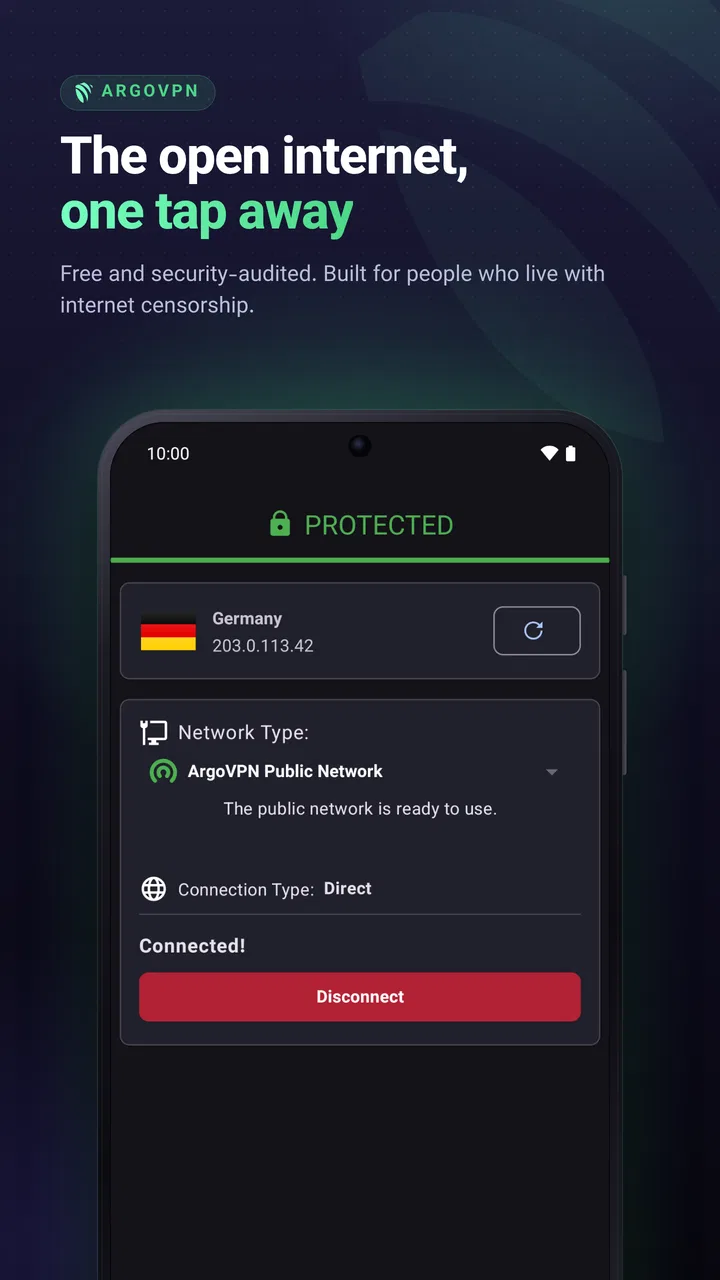
The first-week experience is built around immediacy. The store summary describes changing your IP address with ArgoVPN, and that is the right way to understand the product. It is not trying to be a general internet toolbox with a long list of unrelated functions. You open it when the connection itself needs to appear different, start the VPN process, and then return to the app or website that prompted you to use it.
You May Also Like

 Blood Strike: 2.5 Anniversary
Blood Strike’s Loadouts Turn Every Drop Into a Tactical Gamble
A close look at Blood Strike’s custom loadouts: how fast access to signature weapons reshapes its battle royale rhythm, rewards preparation, and narrows the gap between fights.

 Pandora - Music & Podcasts
Pandora’s Music Is Easy to Start, but Harder to Recover
Pandora’s strength is its low-effort path from a seed to a station. Its weak spot is how much confidence it asks you to place in connection, setup, and quiet recovery.

 8 Ball Pool
 Is Built on Rivalries, Rematches, and Routine
A close look at the rivalries, rematches, shared routines, and unanswered safety questions that turn a quick pool match into a persistent mobile community.

 Samsung Music
’s Quiet Strength Is Playing What You Already Own
Its reach comes less from spectacle than from dependable access to a personal library. That simplicity is both the app’s strongest retention engine and its ceiling.

 AccuWeather: Weather Radar
AccuWeather Review: A Quick, Clear Forecast for Everyday Decisions
For everyday plans, the best forecast is the one you can understand quickly. AccuWeather makes rain timing, radar, and local conditions easy to act on, with a few trade-offs.

 Hill Climb Racing
Why Hill Climb Racing Still Turns Crashes Into One More Run
A tiny car, a bumpy hill and one more upgrade: Hill Climb Racing keeps resurfacing because its simple chaos makes every near-miss feel personal.
More From Our News Desk



That narrow focus makes the learning curve gentle. Someone who has never configured a VPN can understand the basic purpose without reading a technical guide. I also like that the app is free, because it lets a curious user test the idea without committing to a subscription first. The Everyone content rating makes it approachable for a broad audience, although younger users should still understand that a VPN changes how traffic is routed and does not make every online activity automatically safe.
In the first few sessions, the most useful habit is to check whether the connection actually changed before relying on it. I would open a trusted IP-checking page before and after activating the service, then repeat that check after reconnecting. This is not busywork: a VPN icon or an apparent connection does not by itself tell you whether the result is suitable for your particular task. The practical lesson is to verify the outcome once, especially when the app is being used for work or account access.
A realistic everyday example would be using public Wi-Fi in a café while handling routine browsing. I would connect to the café network, open ArgoVPN, wait for the VPN connection to become active, and only then check email or visit ordinary websites. When leaving, I would disconnect the VPN and also turn off Wi-Fi if I no longer needed the network. That final step matters because many people remember to start a privacy tool but forget that the phone may reconnect to the same public network later.
Another early use case is troubleshooting. If a website behaves strangely on your normal connection, switching the apparent IP address can help you determine whether the problem is tied to your network or to the service itself. This does not fix the website, and it should not be treated as a guarantee of access, but it gives you one more comparison point. I found that distinction more useful than simply thinking of the app as a button for “faster” or “safer” internet.
The first-week appeal is therefore real, but limited. ArgoVPN gives a clear reason to exist and removes much of the intimidation surrounding VPNs. At the same time, a quick start is not the same as a complete VPN experience. If your main goal is to select a particular country, maintain a highly consistent connection, or fine-tune how individual apps use the tunnel, you should not assume that a simple interface will provide those controls. Choose it for the task it presents clearly, not for features you hope might be hidden inside.
What the public response suggests
The app has reached more than ten million installs, with an average rating of 4.2 from roughly eighty-one thousand ratings and around three thousand written reviews. Those figures tell me that ArgoVPN has attracted a substantial audience and that many users find the basic idea useful. They do not prove that it will perform equally well on every network, phone, or website. VPN performance is especially sensitive to local conditions, so I treat the public response as a reason to try it, not as a promise of identical results.
Its release on July 17, 2020 also gives the app a longer history than a brand-new utility. The current version is 3.0.18, and the minimum operating-system requirement is Android 5.0. That broad compatibility can be helpful if you are keeping an older Android phone in service. On the other hand, older support does not mean every device will feel equally smooth, so I would judge it by connection stability and battery behavior on the phone you actually use rather than by compatibility alone.
Does it keep earning space month after month?
The answer depends on whether changing your IP is a repeated need or a one-time curiosity. If you only wanted to see how a VPN works, ArgoVPN may lose its novelty quickly. Once the initial test is over, the app has to justify its place by solving a recurring problem. That might be public-network browsing, occasional connection troubleshooting, or a regular need to separate certain browsing sessions from your usual IP address.
For that kind of user, the app’s simplicity can become an advantage over time. I do not need to remember a complicated workflow every time I want to establish a VPN connection. A small utility that I understand is often more useful than a feature-heavy service I rarely open. The recurring value comes from reducing hesitation: when the situation calls for a different IP, I already know which tool to try.
There is also a useful distinction between privacy hygiene and anonymity. ArgoVPN can be part of a sensible routine on an untrusted network, but it should not replace strong passwords, multi-factor authentication, software updates, or careful handling of links and downloads. A changed IP address is only one layer. Websites may still identify you through accounts, cookies, browser settings, device signals, or other information. I would never use this app as an excuse to share sensitive details carelessly.
One of my favorite long-term workflows would be a simple before-and-after checklist. Before connecting, I would note which service I need to use and whether it is sensitive to location or account changes. After connecting, I would test the IP, perform the task, and then disconnect when finished. If a banking app, workplace system, or streaming service is involved, I would be especially cautious. A changed network can trigger security checks, sign-outs, or verification requests, so convenience should not be confused with compatibility.
That workflow exposes an important trade-off. A VPN can help when your ordinary network is the variable you want to change, but it can create friction when a service expects your usual connection. If a website suddenly asks me to prove my identity, I would not keep reconnecting repeatedly. I would return to the normal connection, confirm that the account is secure, and use the VPN only when its benefit outweighs that extra step.
Compared with the usual alternatives in this category, ArgoVPN sits at the accessible end. A paid VPN service may offer a more polished account system, broader server selection, clearer support, or more predictable performance, depending on the provider. A browser-based proxy may be quicker for one browser session but does not cover the same device-level use case. A built-in private browsing mode can reduce local browsing traces but does not change your IP. ArgoVPN is most attractive when you want something more direct than a browser proxy without immediately paying for a larger service.
That comparison also shows where it is not the right choice. If you need a stable location for work, frequent travel, gaming, or region-sensitive services, I would favor a provider whose location and connection behavior are clearly suited to that purpose. If you need detailed controls over which apps use the VPN, I would choose a service that explicitly offers those controls. ArgoVPN’s strength is its focused entry point, not its ability to replace every kind of VPN.
The maintenance that determines whether I keep it
Maintenance is not just updating an app. With a VPN, it also means remembering when the connection is active. I would make a point of checking the status before opening services that care about location or account security, and checking again when I am done. Leaving a VPN on all day may be harmless for some people, but it can also change how websites behave, affect connection speed, or make local services think I am somewhere else.
My preferred routine is task-based rather than permanent. I activate ArgoVPN for a specific reason, use it for that session, and disconnect afterward. This keeps the app from becoming an invisible source of confusion. If a page loads differently, a payment fails, or a location-based feature disappears, I know to check the VPN before blaming the website or the phone.
I would also keep the app updated through the normal Android app-update process. The current version is 3.0.18, and staying current is a sensible part of maintaining any network utility. Still, updates should not be treated as proof that every connection issue is solved. If a problem appears after an update, I would test on another network, restart the connection, and compare the result with the VPN disabled. That small troubleshooting sequence prevents a lot of guesswork.
Battery and data awareness are part of the same maintenance question. A VPN adds another layer between the phone and the internet, so I would avoid leaving it active simply out of habit when I do not need it. I would also watch for unusual behavior such as applications repeatedly reconnecting or media loading more slowly. Those signs do not automatically mean ArgoVPN is at fault, but they are good reasons to compare normal and VPN connections before deciding whether the app fits your daily routine.
Where the routine starts to feel tiring
The first source of fatigue is uncertainty. A VPN connection can look active while the result is not ideal for the specific website or service I am using. That is why I recommend one-time verification and occasional spot checks. The inconvenience is small for casual browsing, but it becomes annoying if every session requires repeated testing or reconnection.
The second is inconsistency across networks. A tool that behaves well on home Wi-Fi may feel different on mobile data, public Wi-Fi, or a crowded connection. I would not judge ArgoVPN from one successful test alone. I would try it in the places where I genuinely expect to use it. If the app’s only reliable use is at home, while the original reason for installing it was public Wi-Fi, that is a meaningful limitation.
The third is the temptation to use a changed IP as a shortcut around service rules. I would avoid that mindset. Some platforms may block unfamiliar addresses, request additional verification, or restrict activity when a connection looks unusual. Trying to force a service to behave differently can create more trouble than it solves. The responsible use case is protecting a connection or testing network behavior, not assuming that an IP change overrides a platform’s terms or security systems.
There is also a social and practical cost to explaining the app to less technical family members. “It changes your IP” is easy to say, but the consequences are less obvious. A relative may think it hides every part of their identity, or may forget to turn it off before using a location-dependent application. If I recommended ArgoVPN to someone else, I would give them the short rule: use it for a clear purpose, verify the connection when it matters, and do not treat it as complete online protection.
These points do not make the app poor; they define its ceiling. The more often I have to manage location behavior, investigate connection differences, or explain why a VPN is not anonymity, the more attractive a fuller paid service becomes. ArgoVPN remains easier to justify when the task is occasional and the user is comfortable with a little hands-on checking.
Who should install it, and who should skip it?
I would recommend trying ArgoVPN if you want a free, approachable way to experiment with changing your IP on Android. It is especially reasonable for someone who uses public Wi-Fi from time to time, wants a simple troubleshooting comparison, or needs a VPN only for short, clearly defined sessions. The broad Android compatibility is another practical advantage for people who are not using a recent phone.
I would skip it if your priority is a guaranteed country selection, a highly consistent route for professional work, advanced per-app control, or a service with extensive customer support expectations. I would also skip it if you are looking for a complete privacy solution rather than one network layer. In that situation, the better purchase is not necessarily the most expensive VPN; it is the one whose controls, policies, support, and performance match the specific risk you are trying to manage.
For iPhone users, I would first confirm that the version and behavior available on their device match their needs before planning a routine around it. The experience I am assessing here is centered on its Android role as a tools app, where the minimum requirement reaches Android 5.0. That makes it a natural fit for Android users, but it should not lead anyone to assume that every platform offers the same interface or controls.
My long-term verdict after the novelty fades
ArgoVPN earns lasting space on my phone only when I use it as a focused utility, not as a permanent badge of security. Its free access, clear purpose, broad Android reach, and approachable first-week experience make it easy to recommend as a trial. The app’s strongest recurring benefit is convenience: when I need to test or use a different IP, I have a simple tool ready rather than having to learn a complicated VPN service from scratch.
Its weaknesses become clearer with time. I still need to manage when it is active, verify that the connection suits the task, and accept that some websites or account systems may react badly to a changed network. Those are not minor details for daily users. They determine whether the app feels like a helpful shortcut or another connection problem to troubleshoot.
My final recommendation is therefore conditional but positive. Install it if your need is occasional IP changing and you are willing to use a sensible start-check-use-disconnect routine. Keep it if it continues to solve that problem without frequent reconnections or confusing side effects. Replace it with a more comprehensive VPN when your needs grow into predictable locations, advanced controls, stronger support, or a more hands-off experience.
ArgoVPN is best understood as a practical entry-level tool, not an all-purpose privacy shield. That honest expectation is what gives it the best chance of remaining useful after the initial curiosity disappears.
FAQs for ArgoVPN
01What is ArgoVPN and how does it work?
ArgoVPN is a free VPN service designed to enhance your online privacy and security. It encrypts your internet connection, making it difficult for hackers or third parties to track your online activities. By routing your traffic through secure servers, ArgoVPN allows access to blocked content and provides a safer browsing experience.
02Is ArgoVPN safe to use for online privacy?
Yes, ArgoVPN prioritizes user privacy and security by utilizing strong encryption protocols. It ensures that your data remains confidential and inaccessible to unauthorized entities. However, as with any VPN service, it is essential to review their privacy policy and understand their data handling practices to ensure it aligns with your privacy needs.
03Does ArgoVPN affect internet speed?
Using any VPN, including ArgoVPN, may slightly reduce your internet speed due to the encryption process and the distance your data travels to reach the VPN servers. However, ArgoVPN is optimized to minimize speed loss, providing a balance between security and performance for a smooth browsing experience.
04Is ArgoVPN available for both Android and iOS devices?
ArgoVPN is primarily available for Android devices. Users can download it from the Google Play Store. Unfortunately, there isn’t a dedicated iOS app at this time, but users can keep an eye on official updates or explore compatible alternatives for iOS devices.
05Are there any costs or subscription fees for using ArgoVPN?
ArgoVPN is completely free to use. It does not require any subscription fees or hidden charges. The service aims to provide accessible and secure internet browsing for everyone. Users can enjoy all its features without worrying about financial commitments.
Pros
- Easy to set up and use.
- No registration required.
- Offers ad-blocking feature.
- Free with no hidden costs.
- Supports multiple devices.
Cons
- Limited server locations.
- Occasional connection drops.
- No advanced security features.
- Not ideal for high-speed streaming.
- Limited customer support.

ArgoVPN
Gallery